
Cortex One — Self-hosted Enterprise AI | Apeiron
Agentic search, custom agents and 50+ connectors: enterprise AI deployed by Apeiron inside your own infrastructure. Private, secure, vendor-neutral.
Let's talk
Cortex One — Apeiron's self-hosted enterprise AI platform
"LLMs know about everything public, but what if it could also know what's going on in our team? I want an AI coworker, not an AI new hire."
At a glance
- Category: Enterprise AI, agentic search and custom agents
- Deployment: self-hosted (Docker, Kubernetes, AWS ECS), private cloud or air-gapped environment
- Sources: 50+ connected applications, permissions included
- Models: all major providers, or self-hosted models (Ollama, vLLM, LiteLLM)
- Foundation: the open-source Onyx project (MIT licence), customised and deployed by Apeiron
Why Cortex One
Useful company knowledge is scattered: Jira tickets, Confluence pages, Slack conversations, Google Drive documents, GitHub code, CRM, customer support. A general-purpose AI assistant sees none of it. And plugging a public LLM into these tools immediately raises two questions: where does the data go, and who is allowed to see what.
Cortex One answers both. It is the knowledge and context layer for your team and your AI agents: it connects to your applications, indexes their content together with metadata and access rights, then makes it available to a chat interface, specialised agents and any MCP-compatible client — all inside your own infrastructure.
In practice, your people ask a question in plain language — "Where do we stand on this customer's contract?", "What is our release procedure?", "What did we decide on this topic last month?" — and get a sourced answer built only from the documents they are allowed to see.
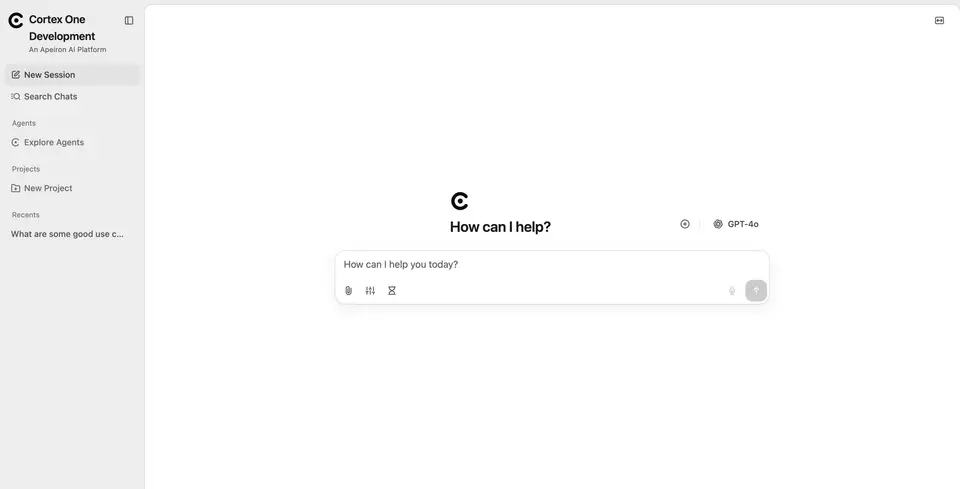 The web app: chat sessions, chat search, agents, projects, voice input and model selection.
How it works
Cortex One builds a unified representation of the company's knowledge. It works in two stages.
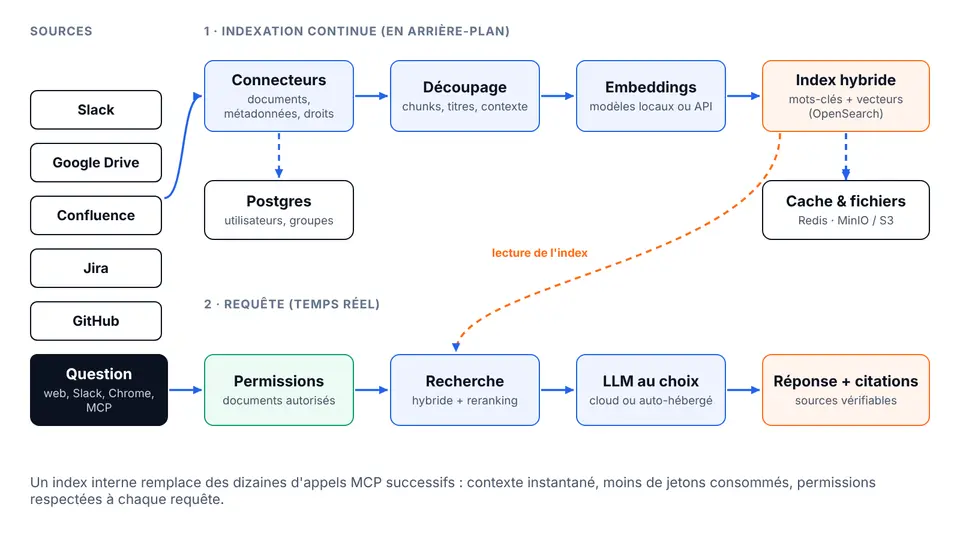 Two separate chains: continuous background indexing, and a real-time query filtered by permissions.
1. Continuous indexing
- Connectors fetch documents with their metadata (author, dates, source) and their permissions.
- Content is split, turned into embeddings by a model of your choice, then stored in a hybrid index combining keyword and vector search.
- Users, groups and rights are kept in a relational database so every query can be filtered.
- Background workers regularly resync sources, so the index stays current without manual work.
2. Real-time query
- The user's question is first filtered by their permissions: only documents they could open in the original tool are eligible.
- A hybrid search followed by reranking picks the most relevant passages.
- The LLM writes the answer from those passages and cites its sources.
Why an index rather than chained MCP calls
"Index-free" approaches ask an agent to query dozens of tools one after another over MCP, burning many tokens, with high latency and uneven results. Cortex One queries its internal representation instantly and sends the model only the most relevant documents: more reliable context, faster, cheaper.
Key features
- Agentic RAG — high-quality search built on a hybrid index and an agent tuned for information retrieval.
- Deep Research — in-depth reports produced by a multi-step research flow.
- Custom agents — AI agents with their own subset of knowledge, instructions and actions.
- Web search — to complement internal knowledge: Serper, Google PSE, Brave, SearXNG, an in-house crawler, and support for Firecrawl and Exa.
- External actions and MCP — agents act inside your applications to complete tasks end to end.
- Secure sandbox — code execution and intermediate artifacts for complex workflows.
- Artifacts — generation of documents, graphics and other downloadable files.
- Voice mode — text-to-speech and speech-to-text.
Knowledge connected to all your applications
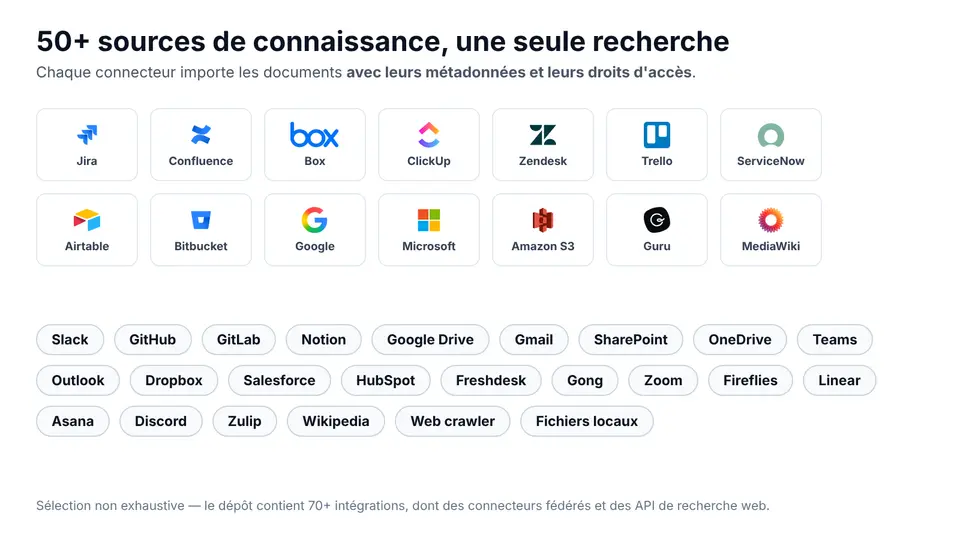 Jira, Confluence, Google Drive, SharePoint, Slack, GitHub, Notion, Salesforce, Zendesk… plus a web crawler for public sites.
Cortex One ships with connectors for the tools where work actually lives: messaging and collaboration (Slack, Teams, Discord, Gmail, Outlook), documentation (Confluence, Notion, SharePoint, Google Drive, Dropbox, Box), tickets and project management (Jira, Linear, Asana, ClickUp, Trello), code (GitHub, GitLab, Bitbucket), CRM and support (Salesforce, HubSpot, Zendesk, Freshdesk), meetings (Zoom, Gong, Fireflies), plus local files and website crawling.
Each connector imports content together with its access rights: someone without access to a Confluence page will never see it in an answer, however they phrase the question.
Data sovereignty and security
When you connect an organisation's knowledge, intellectual property must stay protected — from outside parties and from inside ones.
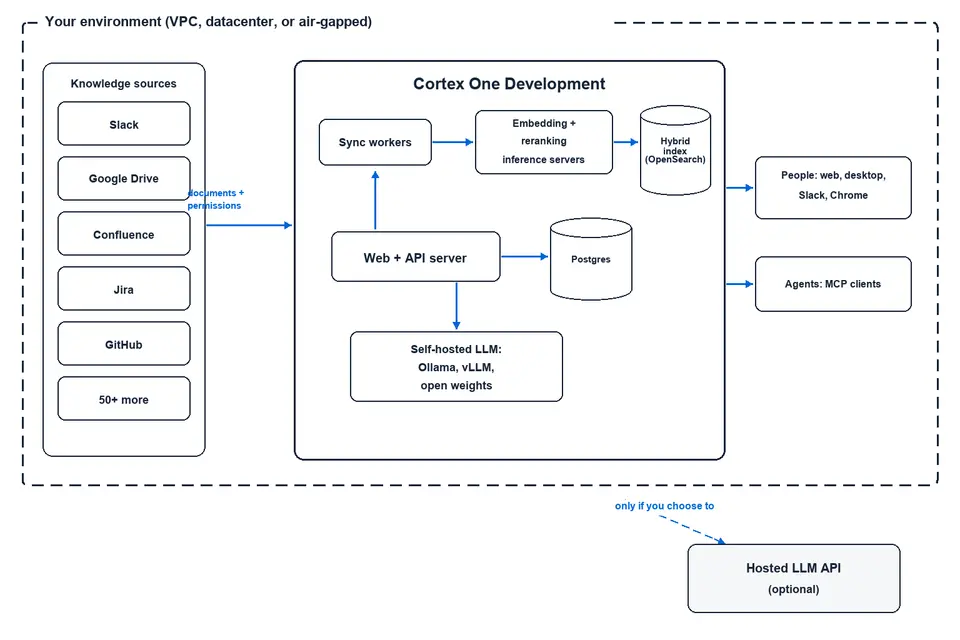 Everything runs inside your environment (VPC, datacenter or air-gapped). Only the call to a hosted LLM API leaves the perimeter — and only if you choose it.
- Air-gappable deployment: the document index, database and processing run in a self-contained set of services you control, even without Internet access.
- Models under your control: you choose the embedding model and the LLM, which can also run locally.
- Permissions respected everywhere: the same rules apply whether the question comes from the web, Slack, Chrome or an MCP agent.
- Traceability: query history and audit log to supervise AI adoption (enterprise features).
Access from anywhere
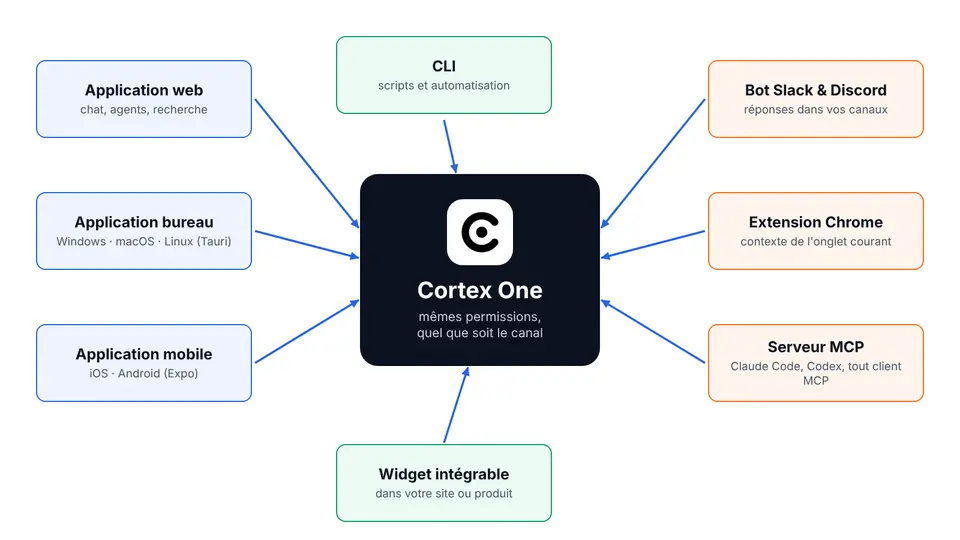 One knowledge engine, eight ways to use it, with the same permissions.
- Web and desktop app (Windows, macOS, Linux) — ask questions and drive your agents.
- Mobile app (iOS and Android) — team knowledge on the go.
- Slack and Discord bot — answers right in your channels, grounded in the organisation's knowledge.
- Chrome extension — query Cortex One from any tab with the page's context.
- MCP server — plug in Claude Code, Open Code, Codex or any MCP client: your coding agents get company context with the rights of the person running them.
- Embeddable widget — add Cortex One's features to your website or product.
- CLI — scripts and automation.
You choose the model
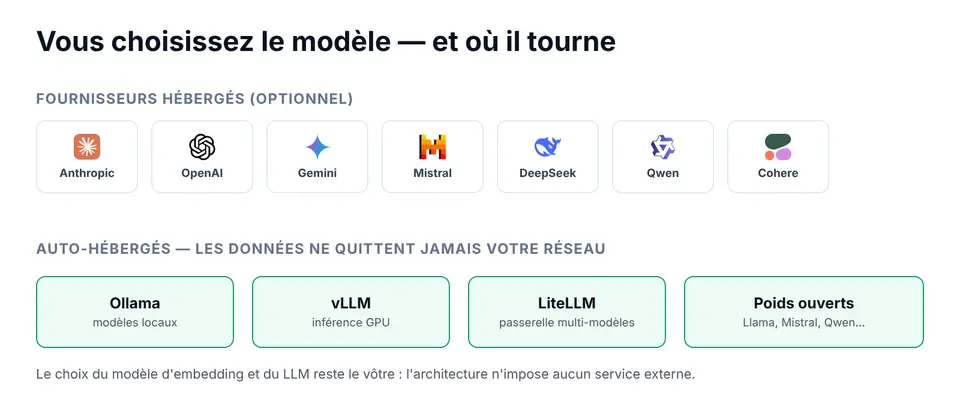 Hosted providers are optional; fully self-hosted models work too.
Cortex One supports the major proprietary providers (Anthropic, OpenAI, Gemini, Mistral, Cohere, DeepSeek, Qwen…) as well as self-hosted models through Ollama, vLLM or LiteLLM. You can switch models without switching tools, compare costs, or enforce a local model for sensitive content.
Two deployment modes
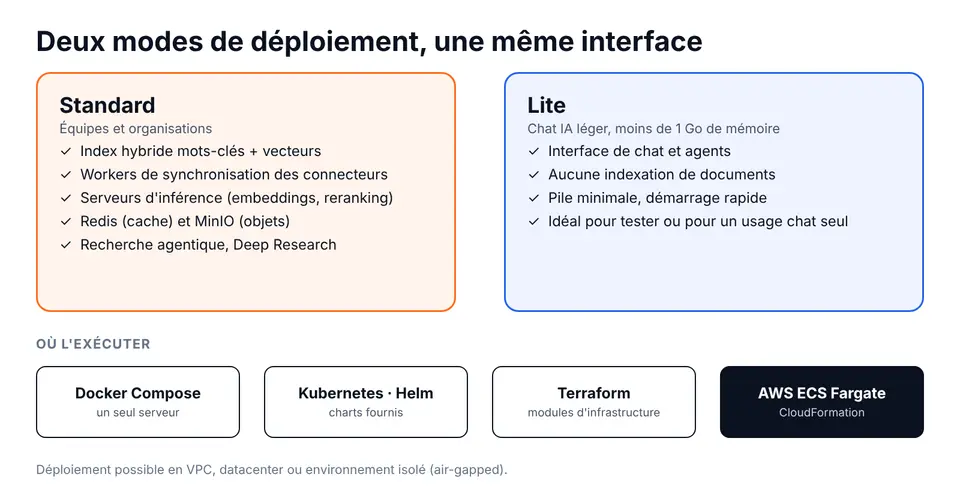 Standard for teams and organisations, Lite for a lightweight AI chat.
| Standard | Lite | |
|---|---|---|
| Use | Teams and organisations | Quick trial, chat and agents only |
| Document index | Yes (keywords + vectors) | No |
| Connector sync | Yes, via workers | No |
| Inference servers (embeddings, reranking) | Yes | No |
| Cache and object storage | Redis, MinIO | No |
| Footprint | Full stack | Under 1 GB of memory |
For a first trial, the full stack starts locally with Docker Compose. In production, Cortex One deploys on Docker, Kubernetes (Helm charts), Terraform or AWS ECS Fargate (CloudFormation), with guides for the major cloud providers.
Features for organisations
Beyond the open-source core, the platform includes features designed for teams of every size:
- Collaboration: share chats and agents across the organisation.
- Single sign-on: SSO via Google OAuth, OIDC or SAML, group sync and SCIM provisioning.
- Role-based access control (RBAC): access to agents, actions and sensitive resources.
- Analytics: usage graphs by team, model or agent.
- Query history: audit usage for controlled adoption.
- Custom code: remove personal data, reject sensitive queries, run custom analysis.
- White-labelling: name, icons, banners and visual identity in your colours.
Under the hood
| Layer | Technologies |
|---|---|
| Backend and API | Python, FastAPI, Celery (background jobs), SQLAlchemy and Alembic |
| Storage | PostgreSQL, OpenSearch hybrid index, Redis (cache), MinIO / S3 (files) |
| Models | Dedicated inference servers (embeddings, reranking), LiteLLM, MCP server |
| Web interface | Next.js, React, Tailwind CSS |
| Clients | Desktop app (Tauri), mobile app (Expo), Chrome extension, Go CLI |
| Deployment | Docker Compose, Helm, Terraform, AWS ECS Fargate |
Use cases
- Customer support: find the right procedure, ticket and template answer in seconds.
- Onboarding: an assistant that knows the documentation, past decisions and the team's tools.
- Engineering: questions about code, tickets and runbooks, including from a coding agent through MCP.
- Sales and pre-sales: answer a tender from existing proposals and references.
- Management and compliance: summaries and deep-research reports, with cited sources and usage traceability.
- Sovereignty-constrained teams: banking, insurance, healthcare, public sector, industry — wherever data must not leave the perimeter.
How Apeiron delivers it
- Scoping. We identify priority knowledge sources, use cases, security constraints and the level of sovereignty required.
- Architecture and deployment. Set-up on your infrastructure or private cloud (Docker, Kubernetes, AWS), with networking, backups, observability and, if needed, isolated mode.
- Connecting sources. Connector, credential and sync configuration, with end-to-end permission checks.
- Model selection. Choosing the LLM and embedding model by quality, cost, language (French, Arabic, English) and data sensitivity.
- Custom agents. Building business agents — support, sales, HR, engineering — with their knowledge, instructions and actions.
- Authentication and governance. SSO, roles, groups, logging and data-protection rules.
- Branding and access. Customisation to your identity; rollout of the Slack bot, Chrome extension, widget or MCP server.
- Training and evolution. Team onboarding, updates, new connectors and continuous improvement of answer quality.
Who it is for
- SMEs and mid-sized companies that want an internal assistant on their tools without sending data to a third party.
- IT departments that must supervise AI use with roles, audit and permissions.
- Product and engineering teams that want to give company context to their coding agents via MCP.
- Regulated organisations that require a controlled deployment, up to an isolated environment.
Licence and attribution
Cortex One is built on the open-source Onyx project, released under the MIT licence (Copyright © 2023–present DanswerAI, Inc.). The original copyright and licence notices are kept. The core — RAG, AI chat, agents and actions — is available under the MIT licence; features aimed at larger organisations, located in ee/ directories, are covered by the Onyx Enterprise License and require a valid licence. Apeiron provides the integration, customisation, deployment and support.
Why choose Cortex One with Apeiron
- Your data stays with you: deployment inside your perimeter, models of your choice.
- No vendor lock-in: open-source base, open standards (MCP), standard infrastructure.
- A team that delivers: Apeiron designs and runs agentic AI, ERP and custom software for clients in France and Tunisia.
- One point of contact: from scoping to operations, with support in French, Arabic and English.
Frequently asked questions
Can Cortex One really be self-hosted, without sending data to a third party?
Yes. The document index, database and processing run in your environment (VPC, datacenter or air-gapped). Only the call to a hosted LLM API leaves the perimeter, and only if you choose that mode: you can also use a self-hosted model with Ollama, vLLM or LiteLLM.
How is Cortex One different from a general-purpose AI chatbot?
A general chatbot knows neither your documents nor your access rights. Cortex One indexes your applications (Slack, Confluence, Jira, Google Drive, GitHub…) with their permissions and answers with sources, using only what each person is allowed to see.
Which applications can be connected to Cortex One?
More than 50 sources: messaging and collaboration, documentation, tickets and project management, code, CRM and support, meetings, local files and website crawling. We configure the priority connectors during deployment.
Does Cortex One work with Claude, GPT or open-source models?
Yes. The platform supports the major providers (Anthropic, OpenAI, Gemini, Mistral, Cohere, DeepSeek, Qwen…) and self-hosted models. You can switch models without switching tools.
Can Cortex One be used with Claude Code or other agents through MCP?
Yes. Cortex One exposes an MCP server: Claude Code, Open Code, Codex or any MCP client gets company context with the rights of the person running the agent.
What is the difference between Standard and Lite mode?
Standard includes the hybrid index, sync workers and inference servers needed to index your documents. Lite is a lightweight chat and agents interface with no indexing, running in under 1 GB of memory.
How much does a Cortex One deployment cost?
The open-source core is MIT-licensed, with no per-user licence fee. The budget depends on infrastructure, the number of sources, the models chosen and the enterprise features you need. We quote after a scoping workshop.
Can Apeiron run a Cortex One PoC before a full rollout?
Yes. We offer a PoC on a reduced scope (a few sources and one use case) to measure answer quality before scaling. See also our MVP and PoC development.
See also
- AI agency in Tunisia: agents, RAG and automation
- MVP and PoC development
- AI agent orchestration for enterprises
- Our work
Let's build your knowledge copilot
Want an AI that truly knows your company, without compromising on confidentiality? Let's talk about your sources, your use cases and your infrastructure.
- Contact Apeiron: contact@apeiron-tech.com
- Tell us about your project