
NEDLOG — ERPNext for garment & workwear manufacturing
ERPNext case study: workwear maker NEDLOG runs Excel order import, size-based BOMs, shortages, purchasing and stores on ERPNext v16, plus a mobile app.
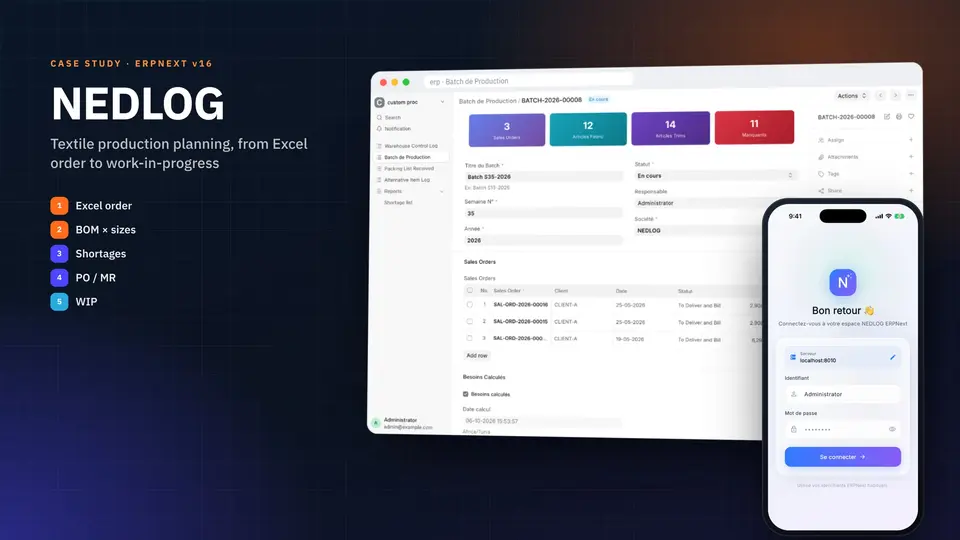
NEDLOG: an ERPNext built around workwear manufacturing
NEDLOG is part of the Workwear Tunisia group, which manufactures professional clothing in Tunisia for the European market: high-visibility garments for road and construction crews, protective wear, rescue and healthcare uniforms. Every garment combines a main fabric with dozens of trims (reflective tape, high-visibility thread, Velcro, zips, buttons, woven labels), and every style comes in a dozen sizes or more.
NEDLOG runs this whole chain on ERPNext, extended with two business apps: from the Excel order file a customer sends, to the materials leaving the store for the cutting floor. Apeiron Technologies took over the platform in 2026. We audited it, put it under version control, wrote its functional test plan, fixed what needed fixing, upgraded it to ERPNext v16 and added a mobile app. This case study walks through the system screen by screen.
At a glance
| Client | NEDLOG, Workwear Tunisia group |
| Industry | Workwear and protective clothing, made in Tunisia for European customers |
| Platform | ERPNext v16 on Frappe 16, plus two custom Frappe apps |
| Scope | Order intake, BOMs, production planning, purchasing, stores, receiving, warehouse control |
| Apeiron's role | Project takeover: audit, versioning, test plan, fixes, v16 upgrade, Flutter mobile app, ongoing work |
The screenshots below come from a full copy of the live system. Customer and supplier names are replaced with neutral codes (CLIENT-A, FOURN-A…).
The challenge: Excel orders, hundreds of materials, two stores
A workwear manufacturer that produces for European brands deals with a particular kind of complexity:
- Orders arrive as Excel workbooks in the customer's own layout, and sometimes in the customer's language: an order form, a size breakdown, a cutting list, a bill of materials, a pro-forma, carton labels. Each customer has its own layout, and a layout can change from one season to the next.
- One style means many items. A pair of high-visibility trousers is a template with one variant per size (including special sizes), each with its own bill of materials (BOM). Quantities of fabric and trims depend on the size.
- Some materials are supplied by the customer. Others are bought from suppliers. The two follow different paths: you ask the customer to ship the first, and you raise a purchase order for the second.
- Two stores, two storekeepers. Fabrics and trims are kept and picked by different teams, across more than 700 stock locations, some of them reserved for a single customer.
Without a system built for this, the work happens in spreadsheets: order lines are retyped, material needs are calculated by hand, and a missing zip is found on the cutting table rather than at planning time.
The ERPNext solution in one picture
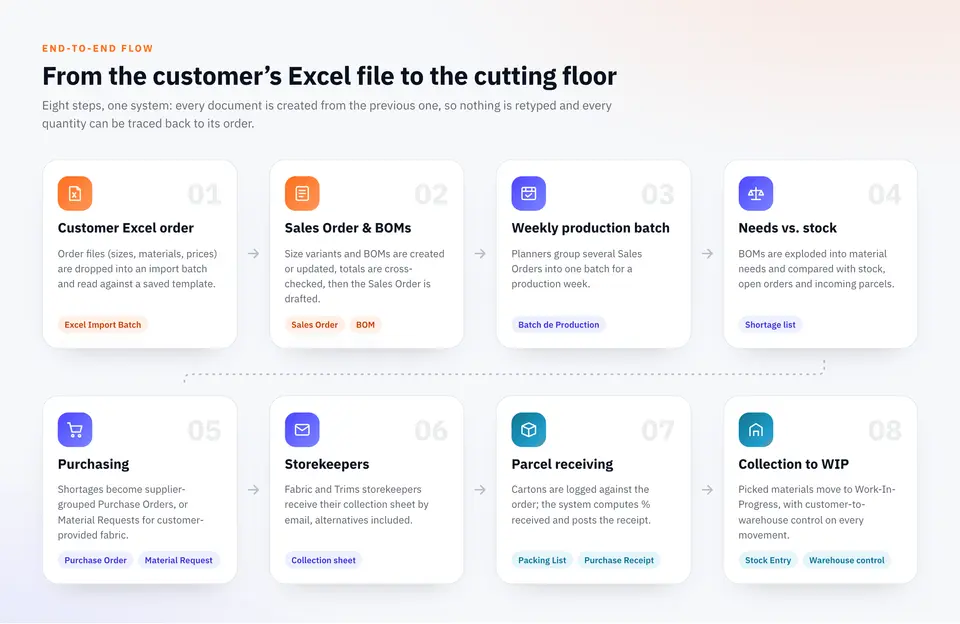
The principle is simple: every document is created from the one before it. The Excel file creates the Sales Order and the BOMs. Sales Orders are grouped into a production batch. The batch computes needs and shortages, which create the purchase documents. Parcels received close those documents, and the collection moves materials to work-in-progress. Every quantity can be traced back to its order.
1. Importing customer Excel orders into ERPNext, with no retyping
An import batch that recognises the file
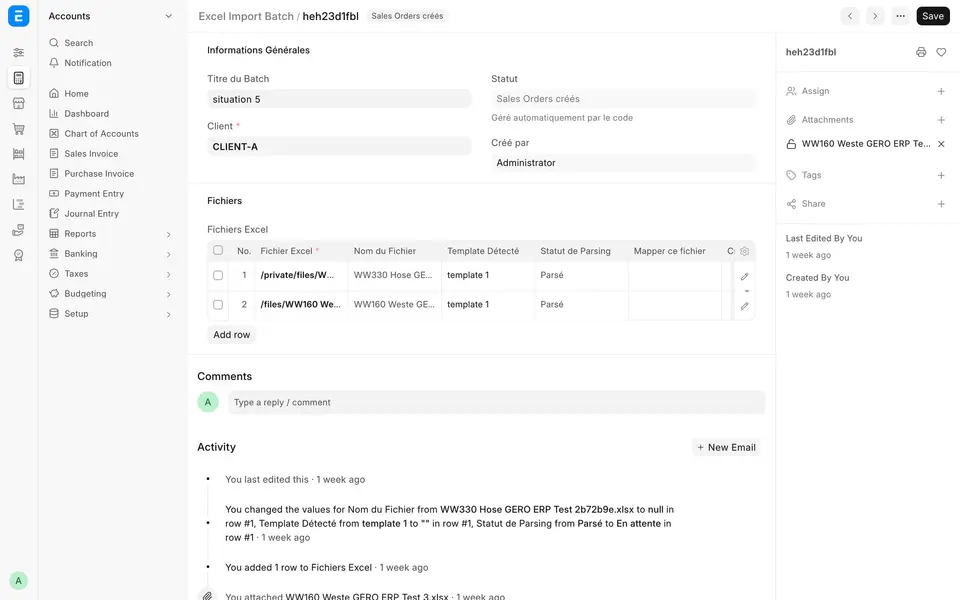
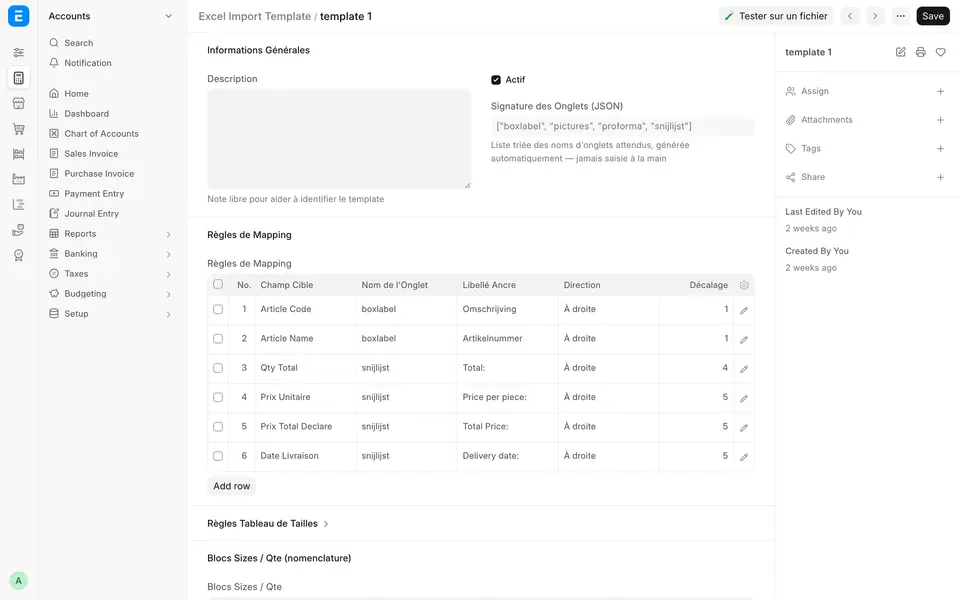
Planners create an Excel Import Batch, pick the customer and drop in one or more order files. Each file is analysed in the background: the system reads the workbook's tab names (its "signature"), finds the matching import template and extracts the data.
Each file ends up with an explicit status:
- Parsed: the layout is known and the data has been extracted.
- Mapping required: the layout is new, so the system asks to be taught it.
- Anomaly detected: the totals don't add up (for example, the size breakdown doesn't match the total quantity). The reason is spelled out, and a wrong file is never marked "Parsed" silently.
Teaching the system a new layout, in a few clicks
When a customer changes its layout, nobody needs to write code. The "Map this file" screen shows a preview of every tab. The user picks a field on the left (article code, quantity, unit price, delivery date, size table), clicks the label in the sheet, then the cell that holds the value. Every rule shows the value it extracts before it is saved.
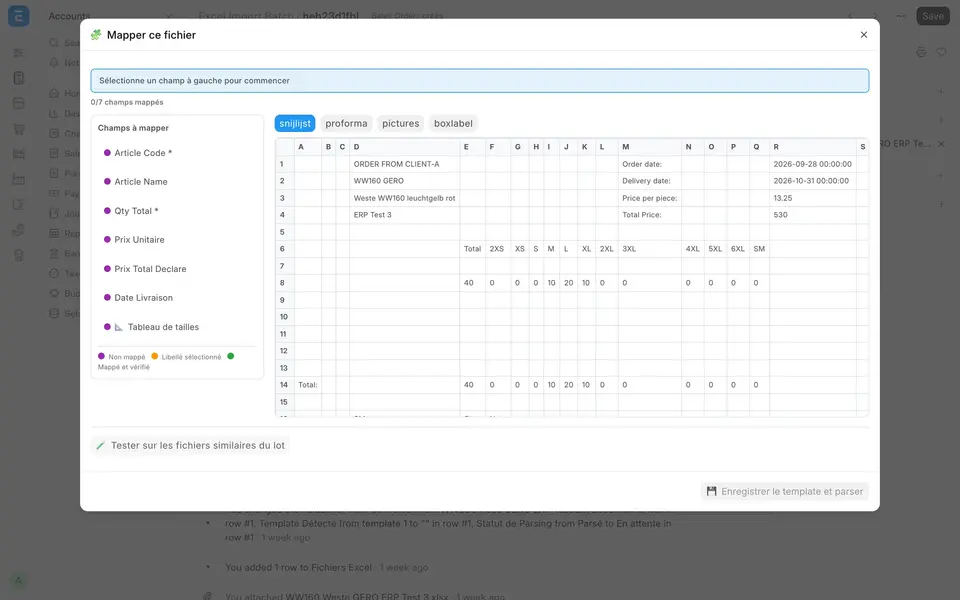
Size tables and blocks (for example zip lengths by size) are defined the same way. Before saving, the template can be tested against the other files in the batch. The saved template then reads every later file with the same layout automatically.
From file to Sales Order and BOMs
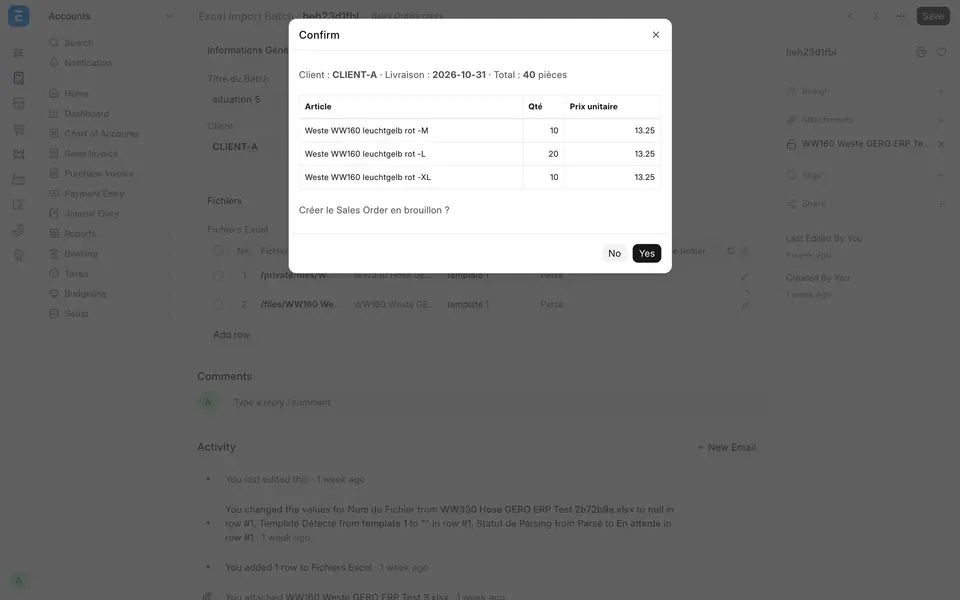
From each parsed file, two buttons do the rest, each with a preview before anything is created:
- Create Sales Order (draft): customer, delivery date, total pieces, and one line per size variant with its price. If an item or its default BOM is missing, the system says which one instead of creating an incomplete order.
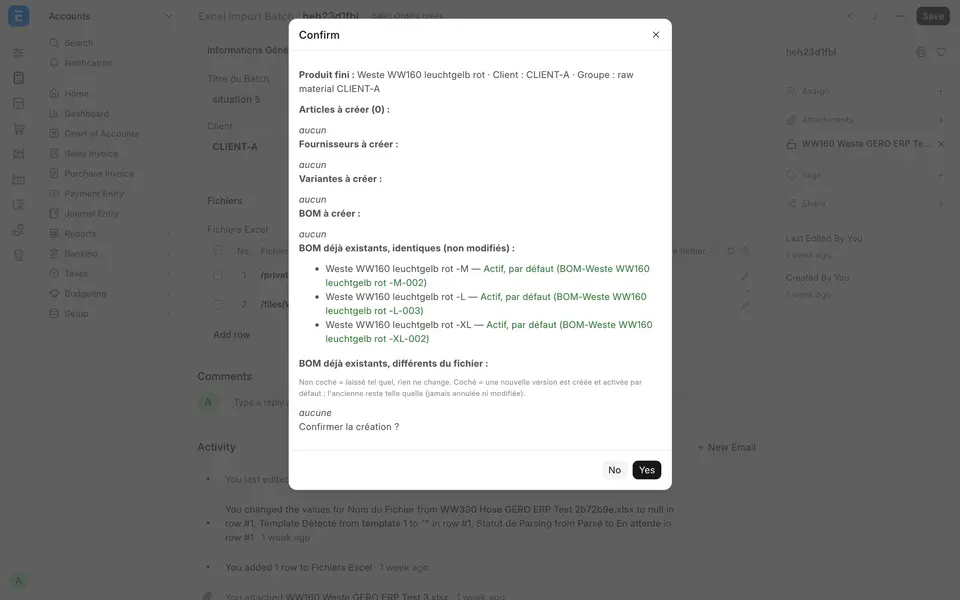
- Create items and BOMs: the item template and its size variants, then the BOMs with material quantities per size. The preview lists the BOMs to create, those that are identical to the existing ones, and those that differ, so nothing is overwritten by surprise.
2. Production planning: grouping orders into weekly batches
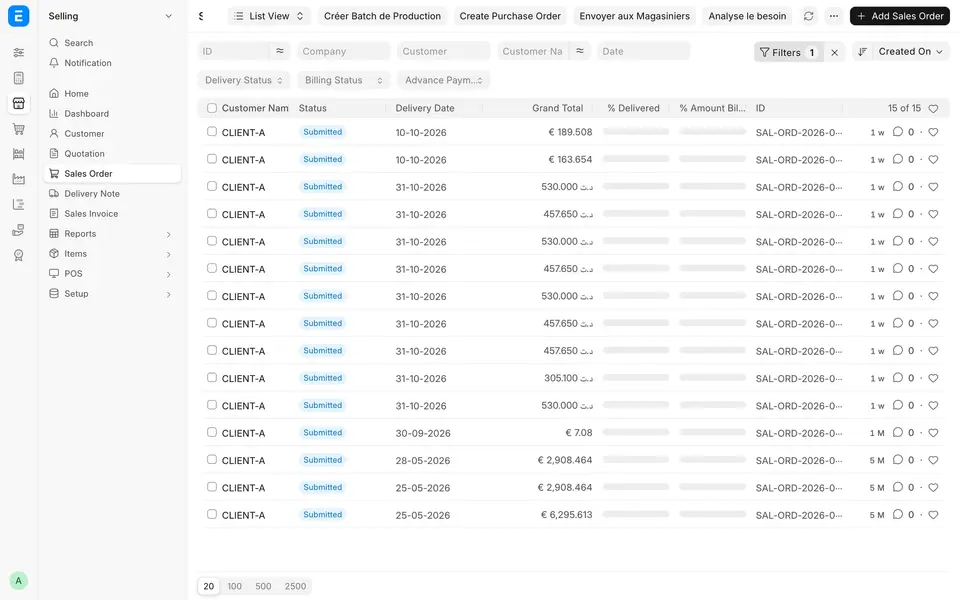
Production is planned by week. From the Sales Order list, NEDLOG-specific buttons start the planning work: Create Production Batch, Analyse needs, Create Purchase Order and Send to storekeepers.
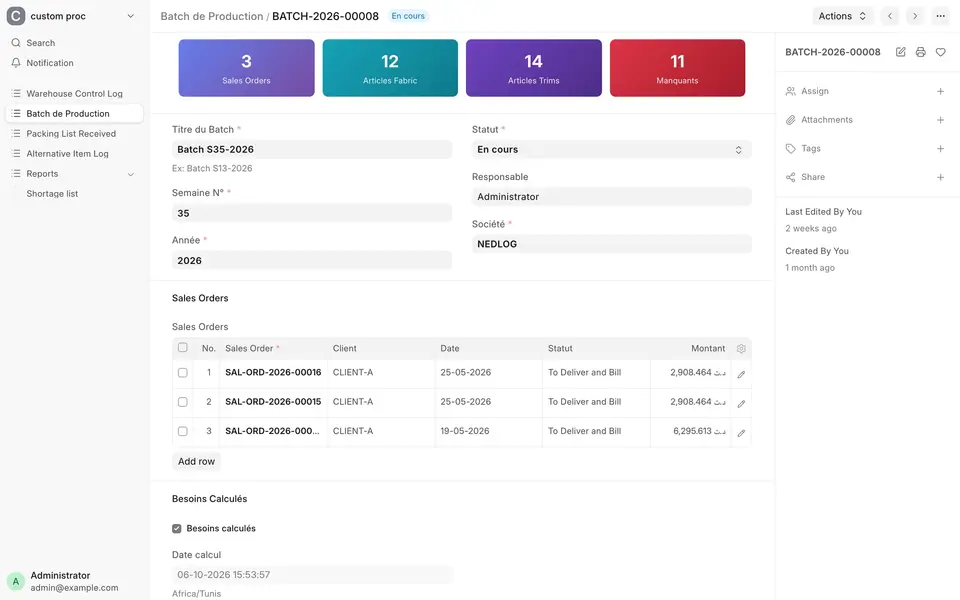
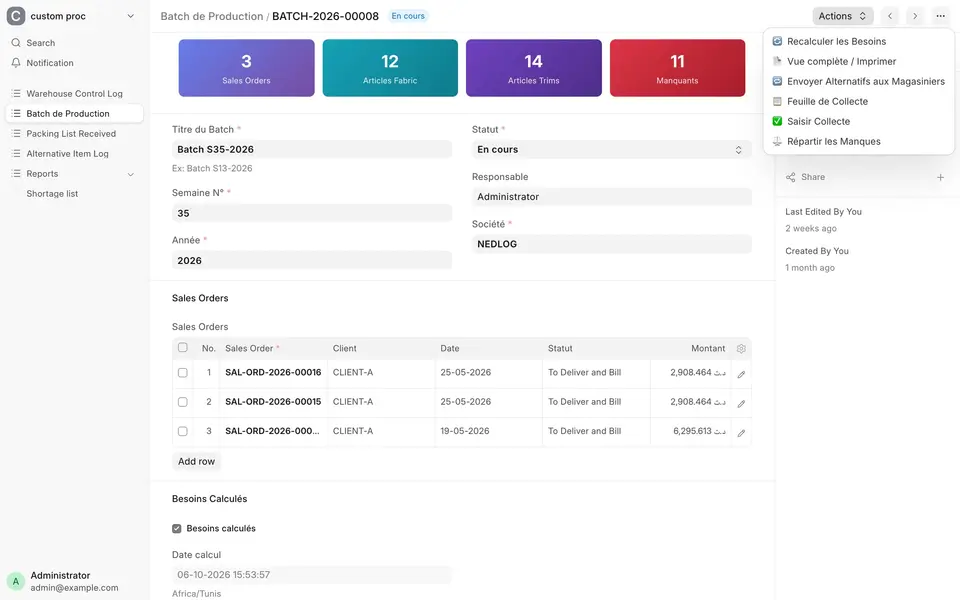
A Production Batch groups the Sales Orders for one production week. It records the week number, year, owner and company, and its dashboard shows at a glance how many orders, fabric items, trim items and shortages it contains.
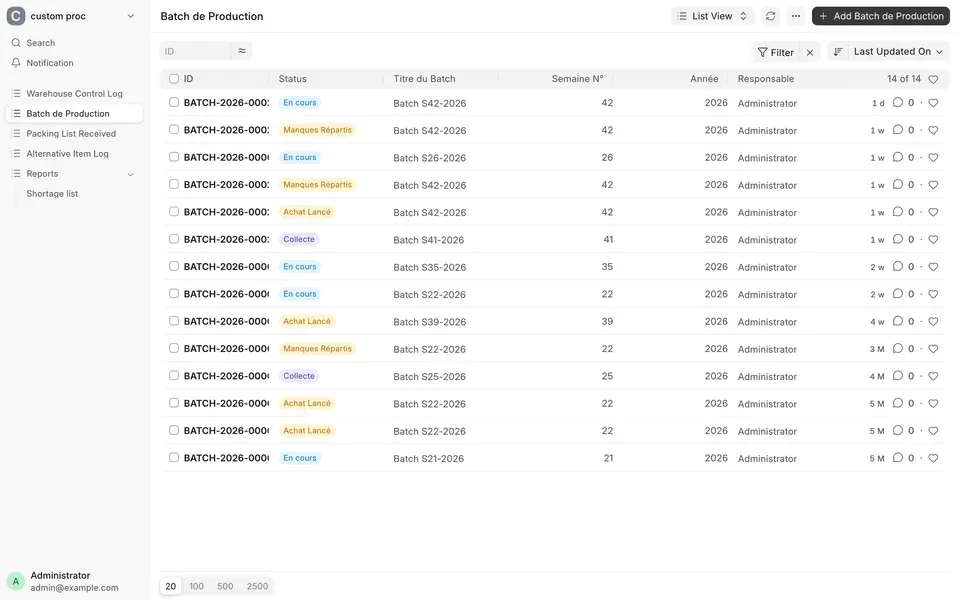
Each batch moves through clear statuses: Draft → In progress → Email sent → Purchasing launched → Collection → Shortages split → Closed. The list view shows where each week stands.
3. Material requirements: seeing shortages before the cutting floor
From BOM to needs table
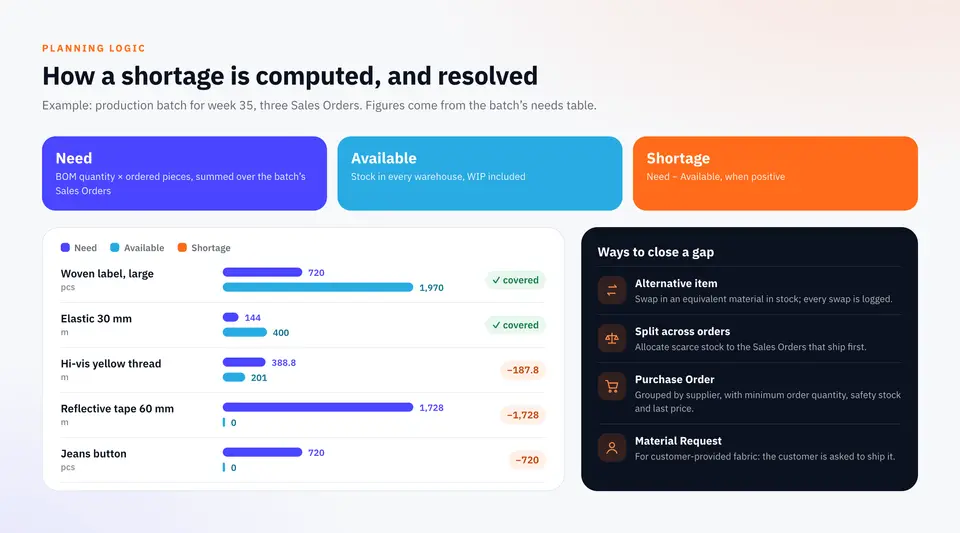
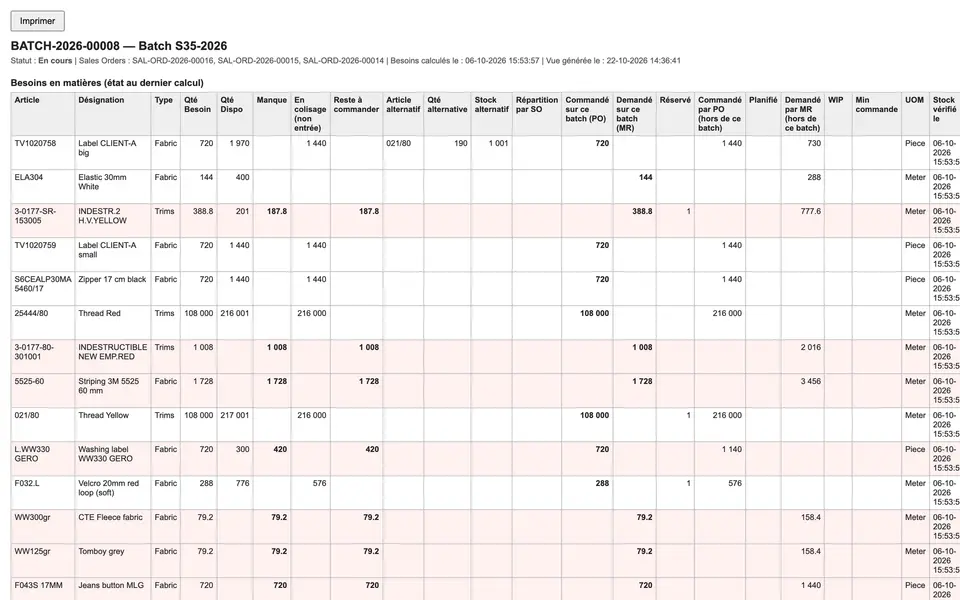
Recalculate needs explodes the BOMs of every order in the batch and builds a needs table. For each material, it shows the type (Fabric, Trims or Other), the quantity needed, the quantity available across all warehouses, the shortage, plus what is already on order in other purchase orders and material requests, and any alternative item in use.
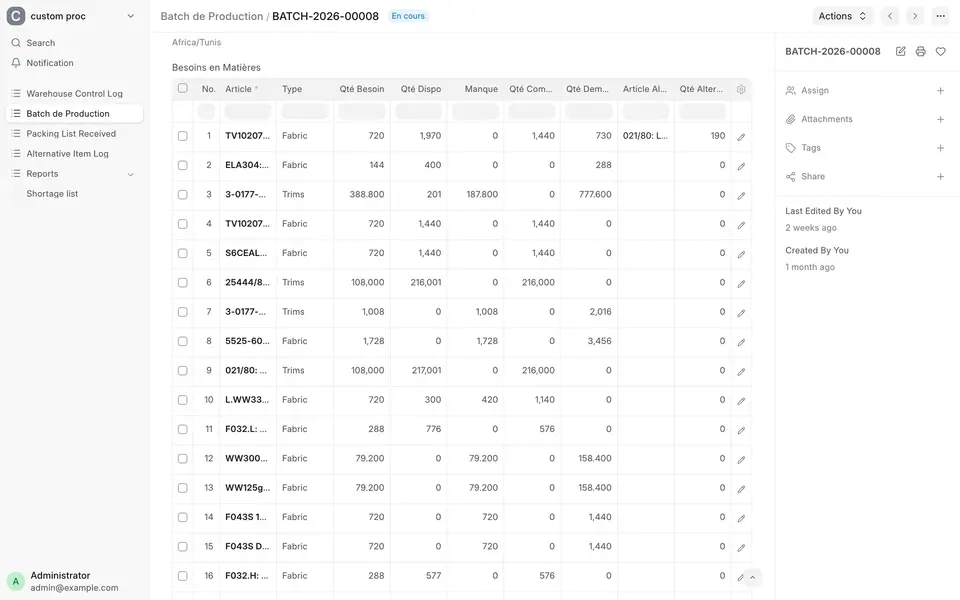
Every recalculation is also written to a stock history, which makes it possible to explain later why a quantity was ordered.
Every action from one menu
The planner drives the batch from a single Actions menu: recalculate needs, open the full view, send alternatives to storekeepers, print the collection sheet, record a collection, split shortages.
The full view puts the whole needs table on one printable page: need, stock, shortage, quantities in incoming parcels, alternatives, split per order, open orders and units.
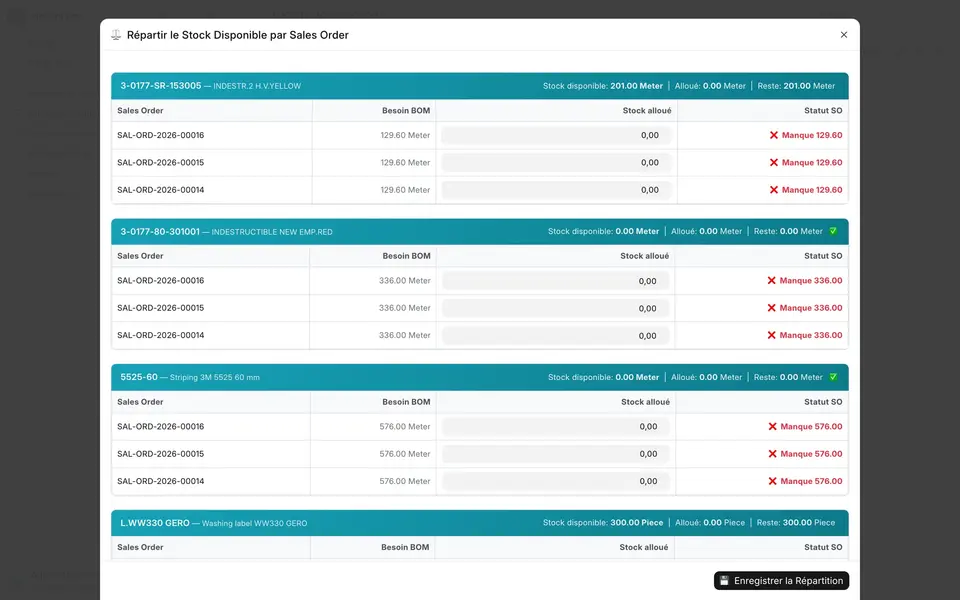
Splitting a shortage between orders
When a material is short, the stock on hand still has to go somewhere. Split shortages shows, for each missing material, every Sales Order in the batch with its BOM need, the stock allocated to it and what remains missing. The planner gives priority to the orders that ship first.
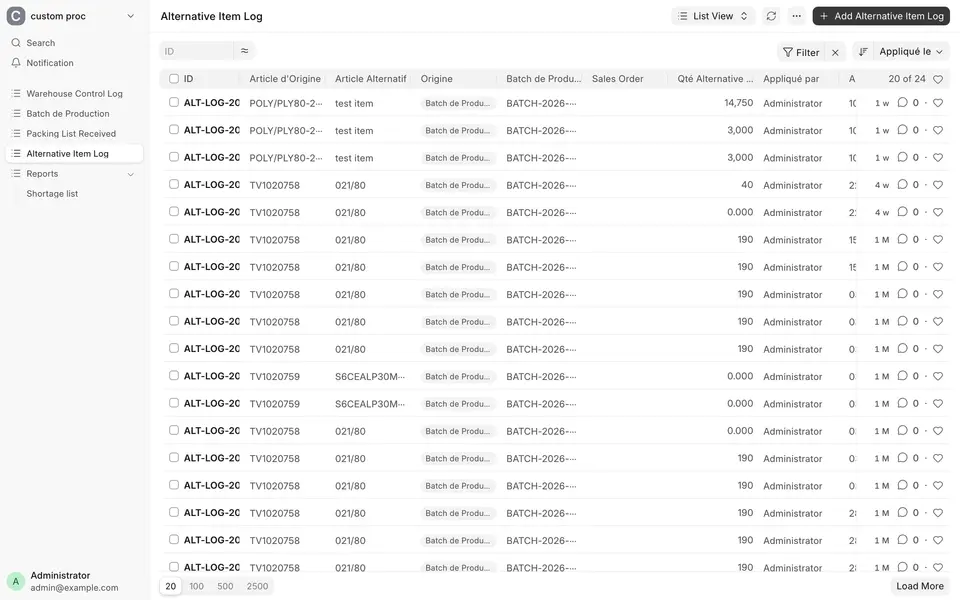
Alternative items, logged
If an equivalent material is in stock, it can stand in for the missing one (via ERPNext's item alternatives). Each swap is recorded in an Alternative Item Log, with the original item, the alternative, the quantity and the batch.
One shortage report across every batch
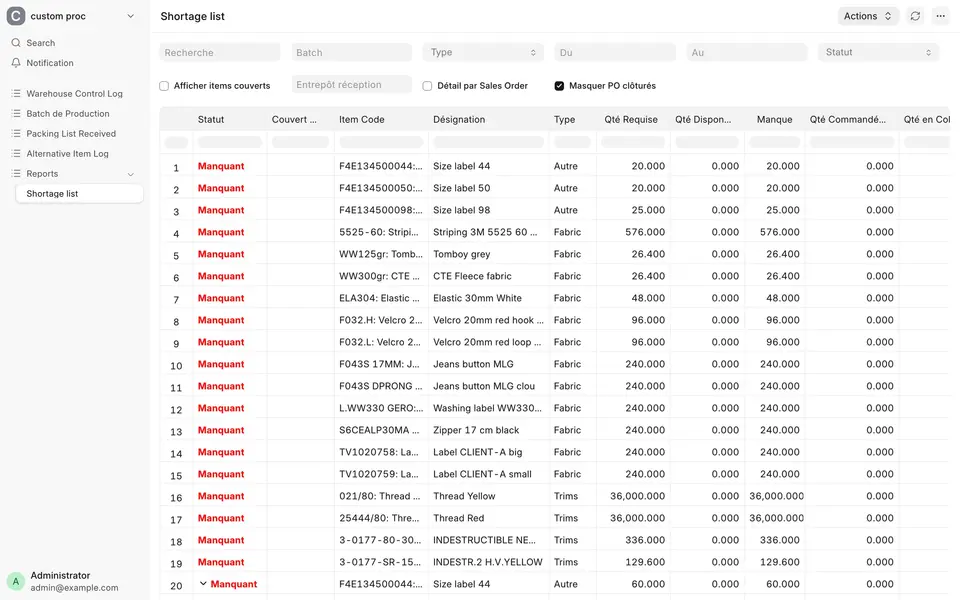
The Shortage list report brings everything together: for each item and batch, required, available, ordered and received quantities, with traceability to the purchase order, the material request and the parcel.
4. Buying exactly what is missing
Launch PO / MR turns shortages into purchase documents, after a preview:
- Purchase Orders grouped by supplier (the item's default supplier), with warnings on minimum order quantity and safety stock, and the last purchase price filled in.
- Material Requests for customer-provided materials, so the customer is asked to ship them, and for items that don't yet have a supplier.
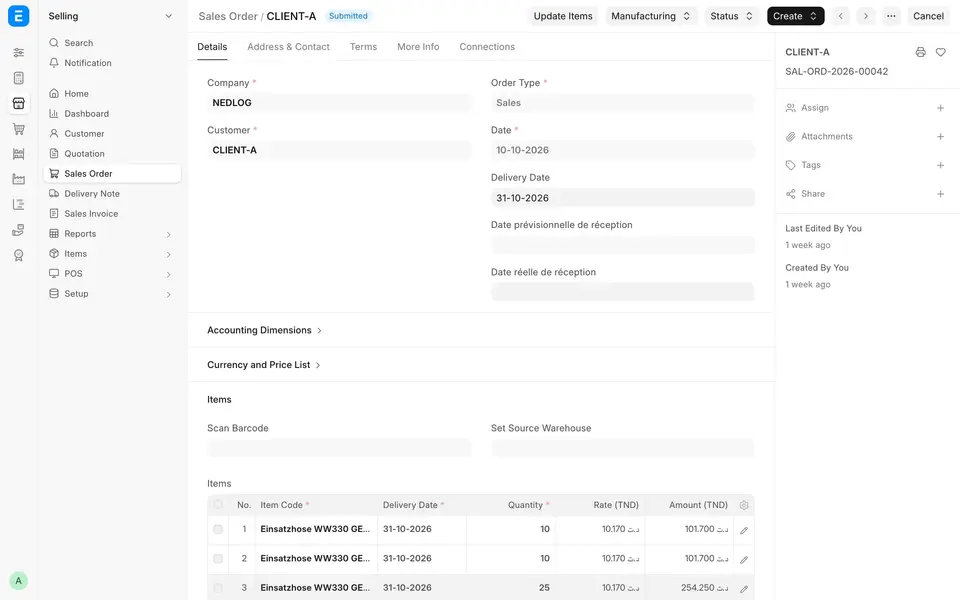
The documents created are linked to the batch (in its Generated documents table) and to the Sales Orders, which also carry expected and actual material receipt dates.
5. Storekeepers: collection sheet and picking
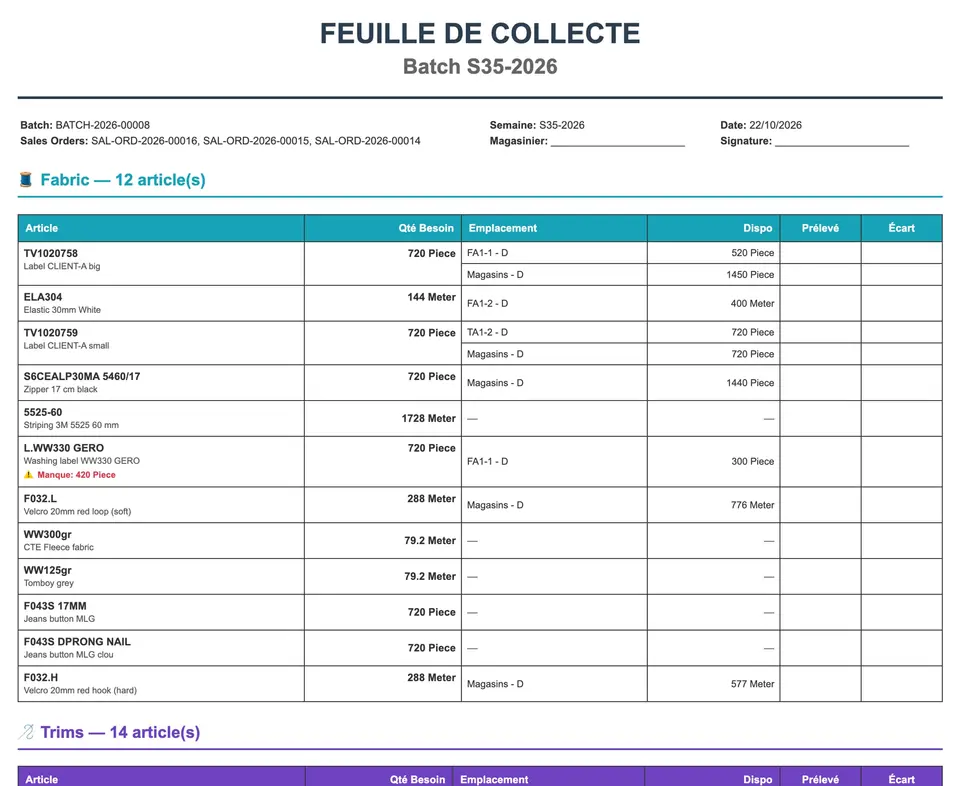
Fabrics and trims don't come from the same store. Send to storekeepers emails each one their own collection sheet: for each material, the quantity needed, the location to pick from and the stock available there, with columns to note what was picked and any gap. Alternatives are sent separately.
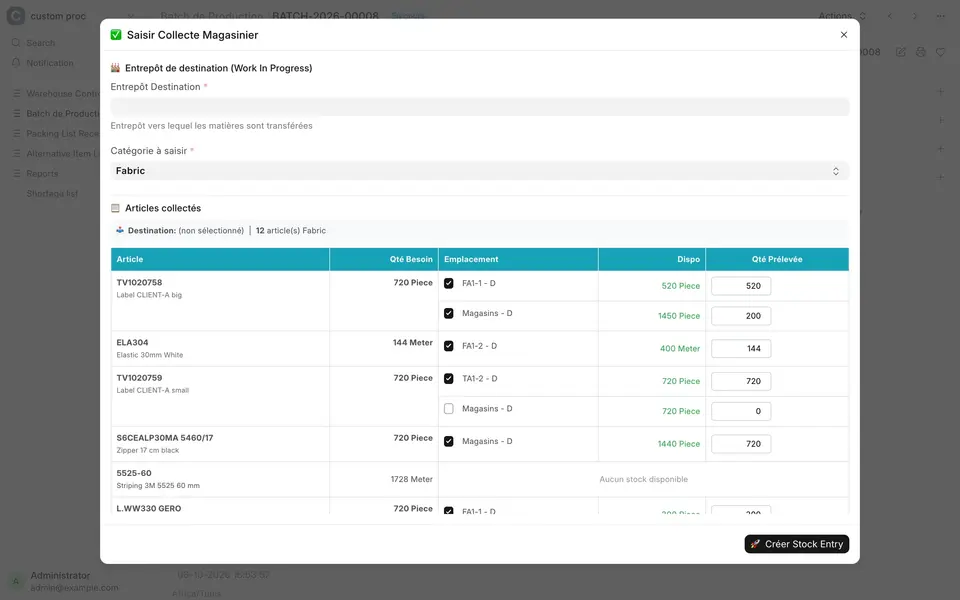
Picking is then recorded in the ERP with Record collection: a destination warehouse (work-in-progress), a category (Fabric or Trims), then for each material the locations to pick from and the quantities, proposed automatically and capped at the actual need. Fabric and trims are recorded separately on the same batch, and the result is a stock entry to WIP.
6. Receiving parcels
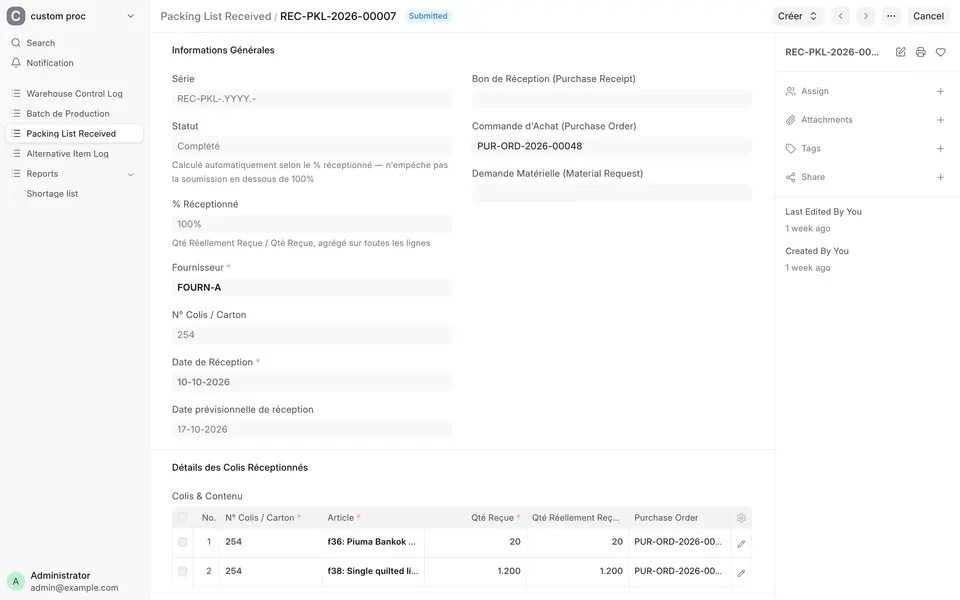
At the dock, every incoming carton is recorded in a Packing List Received against its purchase order or material request: carton number, item, quantity received and quantity actually received. The system calculates the percentage received, then creates the Purchase Receipt, or a stock entry for customer-provided materials.
7. Controlling who stores what, and where
Some locations are reserved for one customer's materials. Each warehouse therefore has an assigned customer, a status (Available / Reserved) and a control mode (Disabled, Warning, Strict).
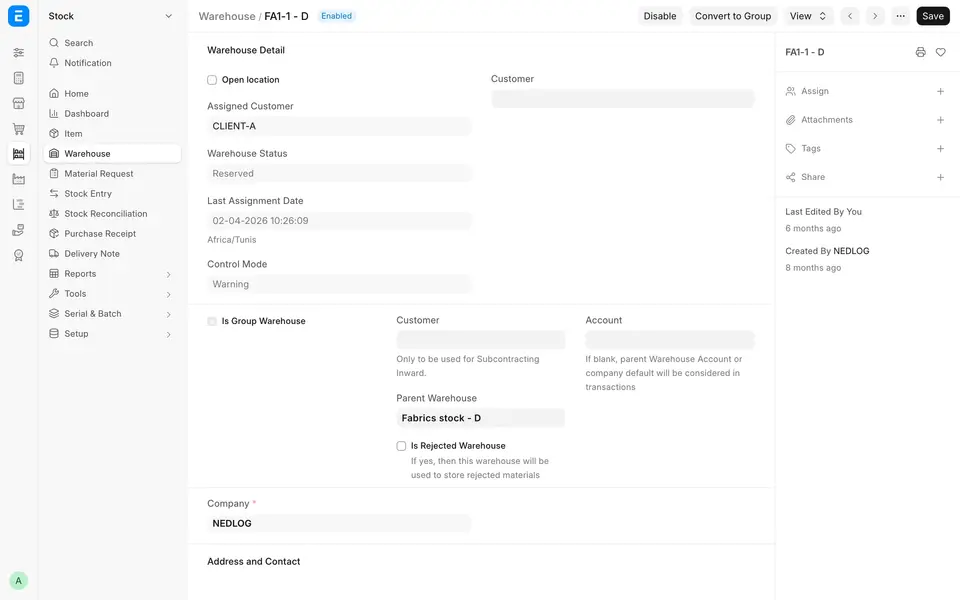
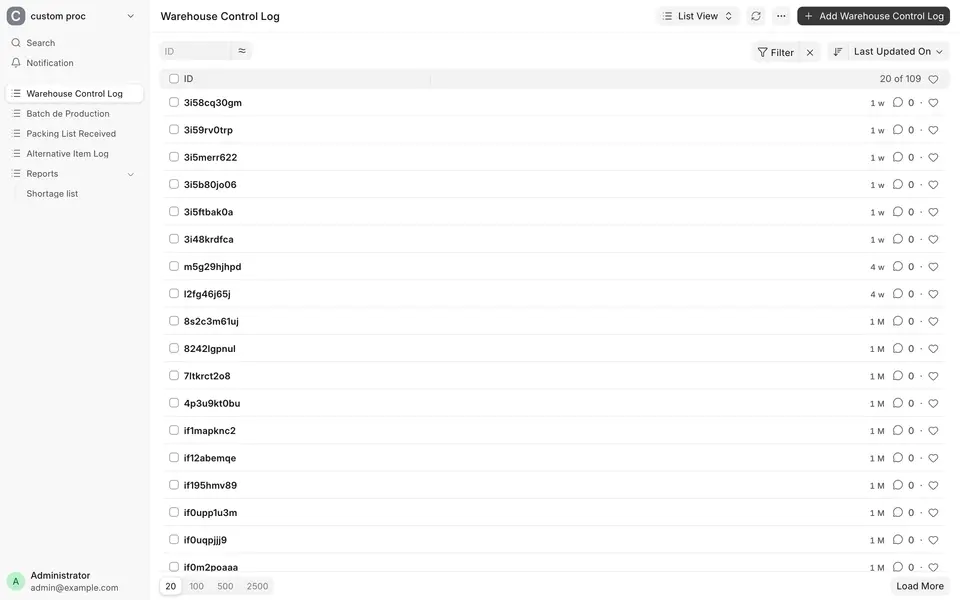
Every time a receipt, stock entry, material request, delivery note or work order is submitted, the system checks the destination warehouse. If one customer's goods are about to go into another customer's location, it warns (or blocks, in strict mode), and records the event in a Warehouse Control Log.
ERPNext architecture: an untouched core and two business apps
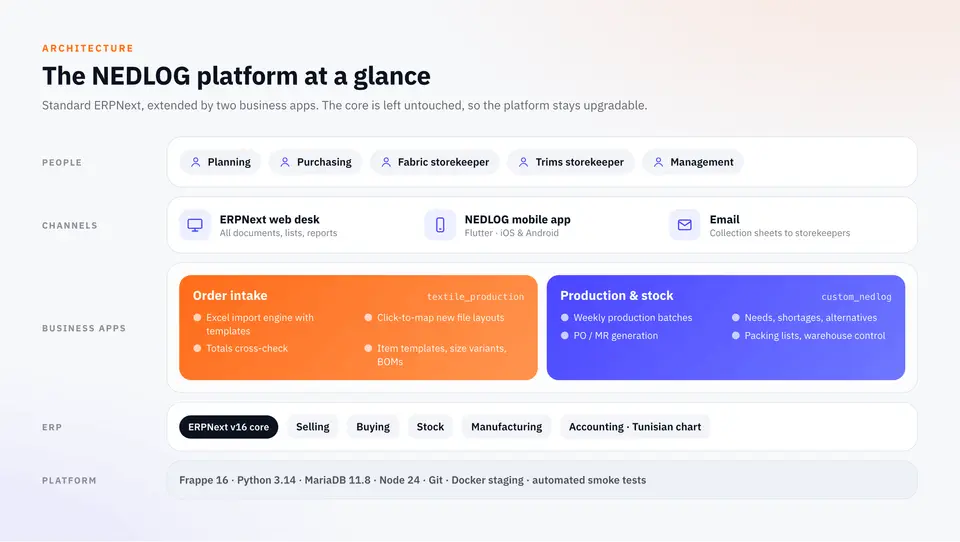
The core of ERPNext is not modified. NEDLOG's business logic lives in two separate Frappe apps:
textile_productionhandles order intake: the Excel import engine and its templates, click-to-map, totals cross-checks, item templates, size variants and BOMs.custom_nedloghandles production and stock: batches, needs, shortages, alternatives, PO/MR generation, storekeepers, packing lists and warehouse control.
Around them sit about sixty configuration settings (fields shown or hidden, naming series, list views), the Tunisian chart of accounts and a dedicated pick-list print format. Because the code sits beside the core, ERPNext can be upgraded, as the move to v16 showed.
How Apeiron took over the ERPNext project
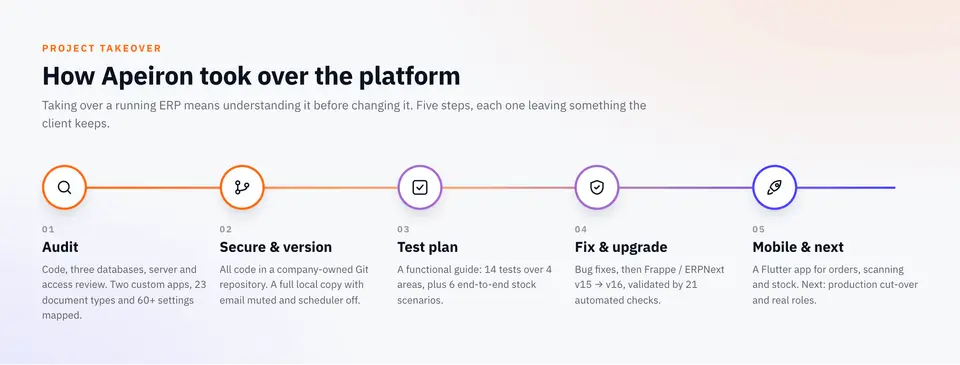
The business apps were built during an earlier phase of the project. When Apeiron took over, the system was already in daily use. That rules out a big-bang rewrite: the first job is to understand what exists before touching it.
1. Audit
Read-only review of the code (both custom apps, roughly 20,000 lines), the three site databases, the server and the access rights. Result: a map of the 23 custom document types, 60+ configuration changes and every customisation, plus a ranked list of risks with recommendations.
2. Secure and version
All the code was consolidated in a Git repository owned by the company. A full copy of the system now runs locally under Docker, with outgoing email muted and the scheduler stopped, so it can be tested on real data without emailing storekeepers, suppliers or customers.
3. A written test plan
A step-by-step functional guide covers 14 tests over four areas: Excel import (T1–T4), production planning (P1–P6), receiving and stock (R1–R3) and configuration (C1). It adds six end-to-end stock scenarios with round numbers you can check in your head: enough stock; shortage covered by the customer; shortage bought from the supplier; a mix of both; priority to another order; replacement by an alternative item. This guide is now the reference for every change.
4. Fixes and the ERPNext v16 upgrade
Bugs found during testing were fixed in the apps (for example, the quantity proposed at collection is now capped at the item's actual need). Then the platform moved from Frappe 15 / ERPNext 15 to Frappe 16.52 / ERPNext 16.51, on Python 3.14, Node 24 and MariaDB 11.8.
Every breaking change in v16 was checked against the custom code:
| v16 change | Impact on NEDLOG |
|---|---|
| No database commit inside document hooks | Fixed: the warehouse control log is now saved with the document that triggers it |
/app URLs moved to /desk | Old links are redirected automatically |
| Default sort by creation date | No query relied on the old order |
| Report and page scripts run in isolation | Shortage report checked: works |
| Python 3.14 | Both apps compile without errors |
The upgrade was rehearsed on a copy of the real database. An automated smoke test of 21 checks (batch needs, PO/MR preview, shortage split, alternatives, reports, packing lists, Excel import of real files, warehouse control) passes 21/21 on v15 and 21/21 on v16, and the key screens were also checked in the browser.
5. A mobile app for the floor
Apeiron also built the NEDLOG mobile app in Flutter for iOS and Android. It connects to ERPNext with the user's usual credentials.
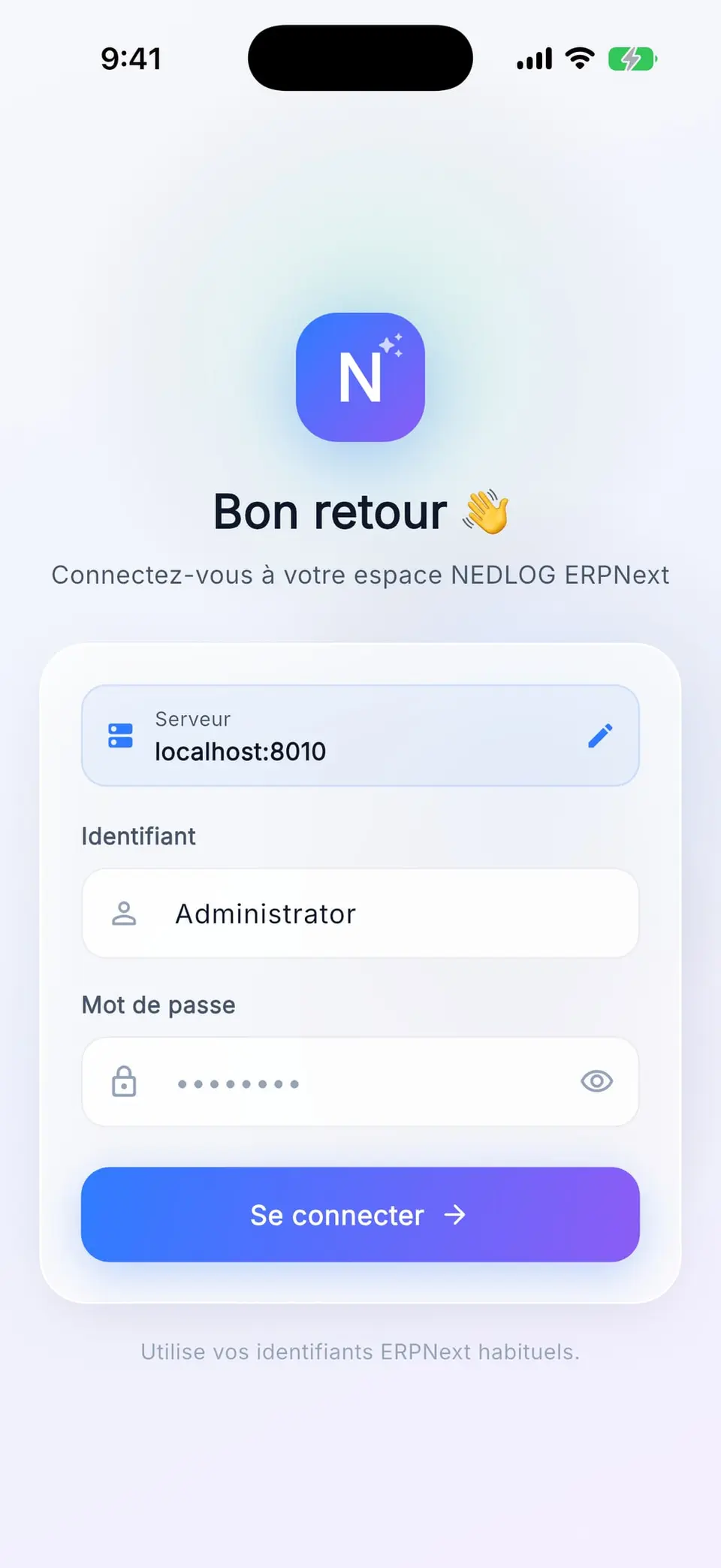
- Home: indicators (orders to deliver and bill, purchases to receive, work orders in progress, open production batches), quick actions and recent activity.
- Modules: sales, purchasing, stock, production (including production batches and packing lists) and collaboration, with search, status filters and infinite scroll.
- Generic document views built from ERPNext metadata: sections, child tables, links, submit and cancel.
- New Sales Order on the go: customer with currency and price list filled in, dates, warehouse, item lines from the catalogue or a scan, priced by ERPNext.
- Scan and stock: camera barcode scan, resolving barcodes, serial and batch numbers, then stock per warehouse.
Results for NEDLOG
- One chain of documents, from the customer's Excel file to work-in-progress. Nothing is retyped, and every quantity traces back to its order.
- Shortages are visible when the week is planned, item by item and order by order, not on the cutting table.
- Purchasing is exact: purchase orders grouped by supplier and requests to the customer for the materials it supplies, generated from the computed needs.
- Stores work from a sheet, and picking is recorded with quantities capped at the need.
- A platform under control: versioned code, a documented test plan, a validated v16 upgrade and a mobile app for teams away from their desks.
Next steps include moving production to v16, dedicated roles (planner, buyer, storekeeper) and rolling the mobile app out to the stores.
Tech stack
| Layer | Technology |
|---|---|
| ERP | ERPNext 16.51 (Selling, Buying, Stock, Manufacturing, Accounting) |
| Framework | Frappe 16.52, Python 3.14, MariaDB 11.8, Redis, Node 24 |
| Business apps | textile_production (order intake), custom_nedlog (production and stock) |
| Mobile | Flutter (iOS and Android), Frappe REST API, barcode scanning |
| Environments | Git, Docker, a full staging copy with email muted, automated smoke tests |
Frequently asked questions
Can ERPNext import customer orders from Excel files?
Yes. At NEDLOG, a custom Frappe app reads each customer's Excel workbook against a saved import template, cross-checks the totals and drafts the Sales Order. A new layout is taught by clicking labels and values in a preview of the sheet, with no code.
Does ERPNext handle size variants and bills of materials for garments?
Yes. Each style is an item template with one variant per size, and each variant has its own BOM with the material quantities for that size. At NEDLOG, variants and BOMs are created or updated straight from the order file, after a preview.
How does ERPNext calculate material shortages for production?
A production batch explodes the BOMs of all its Sales Orders into material needs and compares them with stock in every warehouse, open purchase orders, material requests and incoming parcels. A shortage can then be split between orders, covered by an alternative item, bought from a supplier or requested from the customer.
Can a customised ERPNext still be upgraded?
Yes, when the customisations live in separate apps rather than in the ERPNext core. NEDLOG's two business apps moved from ERPNext v15 to v16 after every v16 breaking change was checked, and 21 automated checks passed on both versions.
Can Apeiron take over an ERPNext project started by another team?
Yes. We start with a read-only audit of the code, databases and server, put the code under version control and write a functional test plan. Only then do we fix, upgrade and extend the system.
What this project shows
ERPNext can be adapted to a very specific trade, here workwear made to order for European customers, without forking its core. Taking over an existing ERP is also a project in its own right: you understand it first, then secure, test, fix and upgrade it, before adding anything new.
Read more about our ERPNext implementation service, our guide to ERPNext and our article on ERPNext for textile factories in Tunisia.